Android notes
Guardrails for an AI Agent on Android: Reviewing, Testing and Publishing My Claude Code Plugin
When an AI agent works on an Android project, the hard part is not writing Kotlin. It is everything around it: did it compile before saying "done", did it commit on the right branch, did the new worktree get the local.properties it needs to build.
I use a small Claude Code plugin that handles those things for me. It is called android-workflow. This week I asked the agent to review it, and the review found real bugs in the guardrails themselves.
This post is the full story: what the plugin does, the review, the bugs one by one, the tests that now catch them, a throwaway Android project built only to try the plugin, one ticket taken from plan to pull request, and how I published it. The plugin is open source, and the install commands are at the end.
Before we start
The plugin is a personal tool: one Mac, my projects, my rules. Everything was tried on one throwaway multi-module project and three real tickets on it. It is not a security boundary, and the limits are listed at the end.
The problem
The plugin is built for running several tasks at once, each in its own terminal with its own agent session. On an Android project that can go wrong in predictable ways:
- The agent says "done" without building. It edits a layout, the Kotlin looks fine, and the resource merge fails.
- A commit lands on
main. It only takes once. - A new worktree does not build. Git worktrees only contain tracked files.
local.properties, a keystore config or a local AAR are not tracked, so a fresh copy fails before any code changes. - Every task starts differently. Sometimes there is a plan, sometimes not. Sometimes there is a GitHub issue, sometimes a Jira ticket, sometimes just a sentence.
Writing "please always compile" in a prompt does not fix this. The agent forgets, or decides it is not needed this time. I wanted checks that run on their own.
What the plugin does
A Claude Code plugin is a folder with commands and hooks. Hooks are commands, here shell scripts, that Claude Code runs at fixed moments, for example before every shell command or at the end of every reply. A hook that exits with code 2 blocks the action, and its message goes back to the agent.
android-workflow has four parts:
| Part | What it does |
|---|---|
| One worktree per task | claude -w <name> creates a copy of the repo on a new branch. The files listed in .worktreeinclude (local.properties and friends) are copied in. |
/android-workflow:ticket | From a Jira key, a GitHub issue or a sentence to a pull request. I approve twice: the plan, and the commit. |
| Build check (Stop hook) | At the end of every reply, if sources or build files changed, it compiles the reference variant. Errors go back to the agent, which must fix them, or say why it can't, before it can stop. |
| Default-branch guard (PreToolUse hook) | Blocks git commit and git push on the default branch, and pushes that target it. |
Each project has a small, local data file that tells the plugin what to build:
{
  "compileTask": ":app:compileBlueDebugKotlin",
  "testTasks": [":app:testBlueDebugUnitTest", ":feature:home:testDebugUnitTest"],
  "checkTasks": ["ktlintCheck"],
  "runTarget": "app@blueDebug"
}
By default the setup commits no files to the project. The data file and the worktree folder are hidden through .git/info/exclude, which works like .gitignore but is never pushed. My teammates only see what any task produces: issues, branches and pull requests.
The rules the agent follows
Before the review, one more piece of context. Claude Code reads a file of global rules at the start of every session. Here is an excerpt of mine. Several of these rules shape what happens later in this post:
## How we work

- Plan first, then code. No implementation without a written plan.
- The plan lives in a document: an issue if the project has a tracker,
  otherwise a file in the repo. Ask me which one if it isn't obvious.
- Implement that plan and nothing else. If something else is needed, tell me
  and stop.
- If the plan turns out to be wrong halfway through, stop and say so. Don't
  patch around it silently.

## Answers

- Always tell me what you did not do, and why.
- If you are unsure, say so. A stated doubt beats a confident wrong answer.

## Git

- Branch, commit, push, merge: only when I ask.
- Never work on the default branch.

## Checks

- Don't say it works unless you ran it. If tests fail, show the output.
- Before deleting or overwriting, look at what is there.
I write to the agent in Italian. The prompts below are translated.
The review
I opened a session in the plugin's folder and asked:
Check this plugin for an Android workflow. Is anything missing that wasn't planned for? Pros and cons. What would you change?
The agent read every file. Then it ran the guard with fake inputs, instead of only reading it. That is where the first surprise came from: the guard blocked the agent's own test. The test ran in a throwaway repo on a feature branch, but the session's folder was on main, and the guard only looked at the session's folder.
The answer listed seven points, in order of importance:
- The guard does not protect
masterordevelopwhenorigin/HEADis missing: it assumesmain. - The guard checks the branch of the session's folder, not of the repo the command acts on.
- In a multi-module project, only
:appunit tests run. - No lint, detekt or ktlint step.
- The build check ignores changes to
.java,.xml,.tomland.gradlefiles. - One emulator is shared by all the parallel tasks, with no lock.
- It is not clear whether closing a worktree deletes the branch after it was renamed.
The pros were real too: everything is local, there are only two approvals, and the build check cannot loop forever. I decided to fix points 1 to 5 and leave 6 and 7 for later.
The bugs, one by one
Following my rules, the agent first wrote a plan as a file in the repo, with the changes, what was out of scope and how each fix would be verified. I approved it, then it wrote the code.
1. The guard protected the wrong branch
The guard found the default branch like this:
default=$(git -C "$dir" symbolic-ref --short refs/remotes/origin/HEAD 2>/dev/null)
default="${default#origin/}"
default="${default:-main}"
origin/HEAD is set when you clone, but often missing in a repo created with git init and a remote added later. Then the fallback is main, and a project whose default is master is not protected at all. The agent proved it before touching the code:
# on master, origin/HEAD unset
0 | git commit -m x
Exit code 0 means "allowed". The fix looks in three places, and never calls the network, because this hook runs before every shell command:
protected=$(git -C "$dir" symbolic-ref --short refs/remotes/origin/HEAD 2>/dev/null)
protected="${protected#origin/}"
if [ -z "$protected" ] && config=$(aw_config "$dir"); then
  protected=$(jq -r '.defaultBranch // empty' "$config" 2>/dev/null)
fi
protected="${protected:-main master}"
The setup command now also offers to run git remote set-head origin --auto once, so origin/HEAD exists and the guess is not needed.
2. The guard looked at the wrong repo
git -C ../other-repo commit or cd other-repo && git commit act on another repository. The old guard ignored that and checked the session's folder. It blocked safe commands, like the agent's test, and allowed unsafe ones.
The fix reads a leading cd <dir> and a git -C <dir>, resolves relative paths and ~, and falls back to the session's folder if the path is not a repository. It still reads the command as text and does not parse the shell. A comment at the top says so: it covers the common cases, it is not a security boundary.
3. Only :app tests ran
testTask was one string, :app:testDebugUnitTest. In a multi-module project the tests in :feature:* never ran. It is now a list, testTasks, and the setup command proposes one task per module that has src/test. The task name depends on the module: a module with product flavors has testBlueDebugUnitTest, a library without flavors has testDebugUnitTest.
4. No lint step
A new optional list, checkTasks, runs at the Verify step of /ticket: ktlint, detekt, spotless, or Android lint if you accept that it is slow. It does not run in the Stop hook, which must stay fast because it runs after every reply.
5. The build check ignored XML and build files
The Stop hook only watched *.kt and *.kts. A broken strings.xml or a bad version in libs.versions.toml went unnoticed until the next Kotlin edit. The list is now:
watched=('*.kt' '*.kts' '*.java' '*.xml' '*.gradle' '*.toml' 'gradle.properties' '*/gradle.properties')The error filter changed too. Kotlin errors start with e: , but resource and manifest errors start with ERROR: and Java errors contain error:.
Testing the guardrails
A guardrail that nobody tests is a guess. The plugin now has tests/run.sh. It needs no Android SDK. It creates throwaway repositories in a temp folder, sends fake hook input as JSON, and uses a fake ./gradlew that fails when a file contains the word BROKEN and counts how many times it ran.
check "commit on master, no origin/HEAD" 2 "$(guard "$tmp/onmaster" "git $C -m x")"
check "cd repo-on-feature && from main" 0 "$(guard "$tmp/onmain" "cd $tmp/onfeature && git $C -m x")"
check "same failure, stop_hook_active: lets Claude stop" 0 "$(stop "$p" true)"
There are 51 cases: the default branch with and without origin/HEAD, pushes like HEAD:main and +main, -C and cd to other repos, which file types trigger a build, the loop protection, and a worktree reading the project data from the main checkout.
All 51 passed on the first run, which proves little: a test that can't fail always passes. So the agent put each old bug back into a copy of the plugin and ran the tests again:
| Bug put back | Failing cases |
|---|---|
1. Fallback to main only | 3 |
2. Ignore -C and cd | 7 |
5. Watch only .kt and .kts | 4 |
Every old bug makes the tests fail. Now they are worth trusting.
A test project that can't hurt a real app
The plugin was born on a large multi-flavor app at work, and the plan was to try the fixes there, in a separate worktree. Then I thought about it again:
Then why don't we try it on a new Android project that we create? I'd make it multi-module: home and settings. That way we don't touch a real repo.
And then:
Make it multi-flavor, where only the theme changes. Don't delete the project at the end: keep it, to test the plugin when we change it or add features.
So the agent built android-multimodule-test:
:app, with Compose and two product flavors,blueandgreen, that change only the theme. Each flavor has one file,src/<flavor>/.../theme/BrandColors.kt.:feature:homeand:feature:settings, library modules with no flavors, each with a ViewModel and a unit test.- A version catalog, ktlint, Gradle 9.3.1 and AGP 9.1.0, with Kotlin built into AGP.
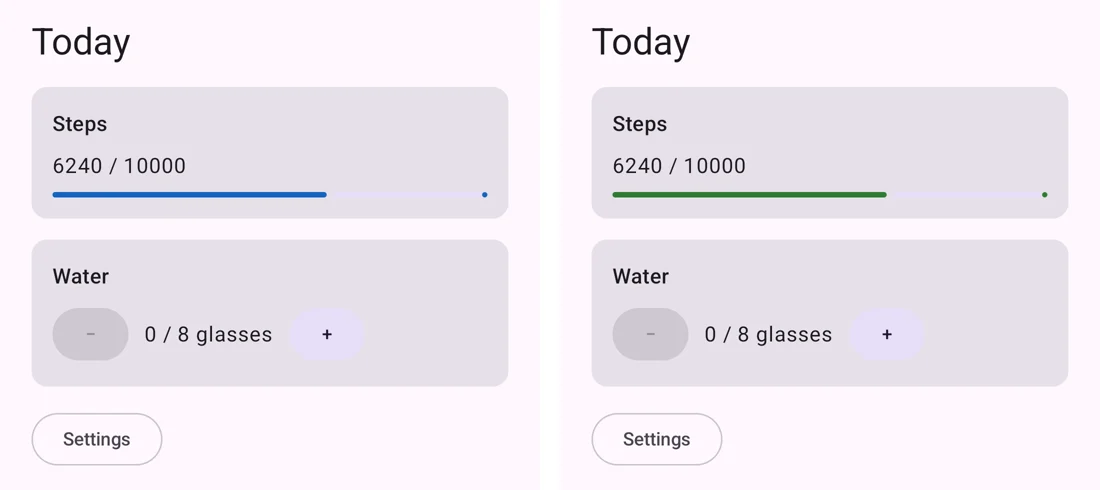
The flavors are useful precisely because the difference is so small. The task names change (compileBlueDebugKotlin), the code does not.
The ktlint trap
The first build passed: both flavors, the tests of all three modules, and ktlintCheck. Then the agent listed the ktlint tasks: there were tasks for the Kotlin scripts (runKtlintCheckOverKotlinScripts), and none for the source sets. ktlint was checking the .kts build files and nothing else.
With AGP 9 the Kotlin plugin is built in, and ktlint-gradle before 14.1.0 does not see those sources, so it passes without checking anything. The changelog of 14.1.0 says it: "Add support for Android projects with new DSL i.e. built-in Kotlin". After the upgrade to 14.2.0, the agent added a file with a formatting error to check that ktlint fails (exit 1), then removed it (exit 0).
If your build has ktlint and you moved to AGP 9, it is worth checking that it still sees your code.
The hooks on a real Gradle build
The fake gradlew proves the logic. This proves it against Gradle. In a temporary worktree of the test project, the agent fed the Stop hook fake input after each edit:
| Edit | Hook result |
|---|---|
| No change | exit 0 at once, no Gradle |
Broken strings.xml in app/res/values | exit 2, with the resource merger error |
| Valid XML change | exit 0 |
Type error in :feature:home | exit 2, with the e: line |
| Same error again, agent already retried | exit 0: it can stop, no loop |
A change to libs.versions.toml | it compiles, exit 0 |
This is what the agent sees when the XML is broken (the path shortened):
Build check failed (:app:compileBlueDebugKotlin). Fix these errors, or tell the user why you can't:
ERROR: .../app/src/main/res/values/strings.xml:4:3: Resource and asset merger: The element type "string" must be terminated by the matching end-tag "</string>".
At the end the worktree and the branch were removed, and git status of the project was the same as before.
One ticket, plan to pull request
Then I used the plugin the way it is meant to be used. I made the test project a private GitHub repo and ran three real tickets, each in its own worktree with claude -w and /android-workflow:ticket. One of them asked to turn the Home into the dashboard of a health app.
The agent first wrote the plan, and after my approval put it in a GitHub issue. A shortened excerpt, translated:
Goal: turn the Home into a daily summary of a health app, instead of the "Taps" counter. The data is fake and stays in memory. The point is to test the
/android-workflow:ticketworkflow, not the design.Out of scope: design and theme; sensors and Health Connect; persistence; Settings and
:app.Verify: compile, every task in
testTasksandcheckTasks, review of the diff.
Then it worked alone until the commit question. The pull request carried the output of the checks:
./gradlew :app:compileBlueDebugKotlin
BUILD SUCCESSFUL (exit 0)

./gradlew :app:testBlueDebugUnitTest :feature:home:testDebugUnitTest :feature:settings:testDebugUnitTest ktlintCheck --continue
BUILD SUCCESSFUL in 1s, 90 actionable tasks (exit 0)

HomeViewModelTest: tests=4 failures=0 errors=0
A device journey on a physical device, after pm clear:
| # | Step | Result |
|---|---|---|
| 1 | Launch: "Today", Steps 6240 / 10000, 0 / 8 glasses, − disabled | ✅ |
| 2 | + twice → 2 / 8 glasses | ✅ |
| 3 | − → 1 / 8 glasses | ✅ |
| 4 | Settings → the Settings screen opens | ✅ |
| 5 | Back → Home, 1 / 8 kept | ✅ |
And a "Not done" section: no persistence, no strings in strings.xml because the module had none, no Compose UI test because the module had no test setup. I merged it myself. Merging stays mine.
Publishing it
The last question was where to publish it:
Does it make sense to publish it personally, or for the company?
The plugin contains no company code, rules or processes once the examples are neutral, so it went to a personal public repo. Before the push:
- Company names out. The README and the
/tickethint used real Jira keys and a real Atlassian URL as examples. They becameABC-123andexample.atlassian.net. - Personal paths out. The README told me to symlink the folder into
~/.claude/skills. It now uses the standard install from a marketplace. - Plans stay local. The plan files mention the work project, so
plans/is in.git/info/exclude. - The right identity. My global git config puts my work GitHub account on every commit. For a personal repo that is wrong, so I pushed from my personal computer.
The repo is its own marketplace: one .claude-plugin/marketplace.json with a single plugin whose source is "./". claude plugin validate passed on both the plugin and the marketplace file.
Then GitHub rejected the first push of the test project twice, once with Internal Server Error and once with fatal error in commit_refs. I never found the cause: the third try went through.
What went wrong
- The guard blocked the agent's own test, as told above. Annoying, and it pointed straight at bug 2.
- A script of the agent broke itself. To compare the pushed files with the local ones, it used a loop variable called
path. In zsh,pathis tied toPATH, so everygitcall failed and every file looked different. It caught it by downloading a few files and comparing them by hand, then reran the loop with another name. - The first commit is blocked by the plugin itself. A brand-new repo has only
master, and the fixed guard blocks commits there. My rules also say that commits are mine. So the agent prepared the command and I ran it with!, which runs in my shell, outside the hooks. - The emulator was full. The first emulator had no space left to install the test app. Wiping it would have deleted my data, so the agent used another one. The first screenshots were text, not images: with two displays,
screencapprinted a warning into the PNG.
What I learned
- Guardrails need tests like any other code. Both hooks had bugs I never noticed, because a guard that lets something through says nothing.
- Prove that a test can fail. 51 green cases on the first run meant nothing until the old bugs were put back and the tests went red.
- Build a playground. A throwaway project with flavors and modules found the ktlint problem in minutes, and nothing on a real app was at risk.
- Ask the agent to run things, not only read them. Bug 2 showed up because the agent ran the guard, not because it read it.
- "Not done" is the most useful line in a report. In the review, in the PR, in every answer.
Limits
- The tests in this post ran on the small test project. The plugin is also set up on a large app at work, with local AARs listed in
.worktreeinclude, an included build and many flavors. - The guard reads command text. Quoted paths with spaces, aliases or a
cdin the middle of a command slip through. - No lock on the shared emulator yet, and the branch cleanup after closing a renamed worktree is still unverified (points 6 and 7 of the review).
- The agent set up the test project by following
setup.mdby hand. The/android-workflow:setupcommand itself was not part of these tests.
Install it
The plugin is at github.com/davideagostini/claude-android-workflow. It needs Claude Code, git, jq and gh.
claude plugin marketplace add davideagostini/claude-android-workflow
claude plugin install android-workflow@davideagostini
Then, in an Android project, run /android-workflow:setup, and start a task with claude -w <name> and /android-workflow:ticket.